
Deployment
Dotnify is a Node.js application — the backend uses the Hono framework running on a Node.js server, and the data layer uses Upstash Redis.
Vercel
Vercel is a supported deployment target.
One-Click Deploy
Click the button below to deploy Dotnify to your Vercel account. Vercel will automatically clone the repository and complete the deployment.
Manual Deploy
1. Import the Project
- Fork the Dotnify repository (make sure to fork the
mainbranch) or clone it locally - Go to Vercel Dashboard and import the repository
- Set the default branch to
mainand Vercel will auto-detect the Vite framework
2. Create an Upstash Redis Database
Option A: Vercel Upstash Integration (Recommended)
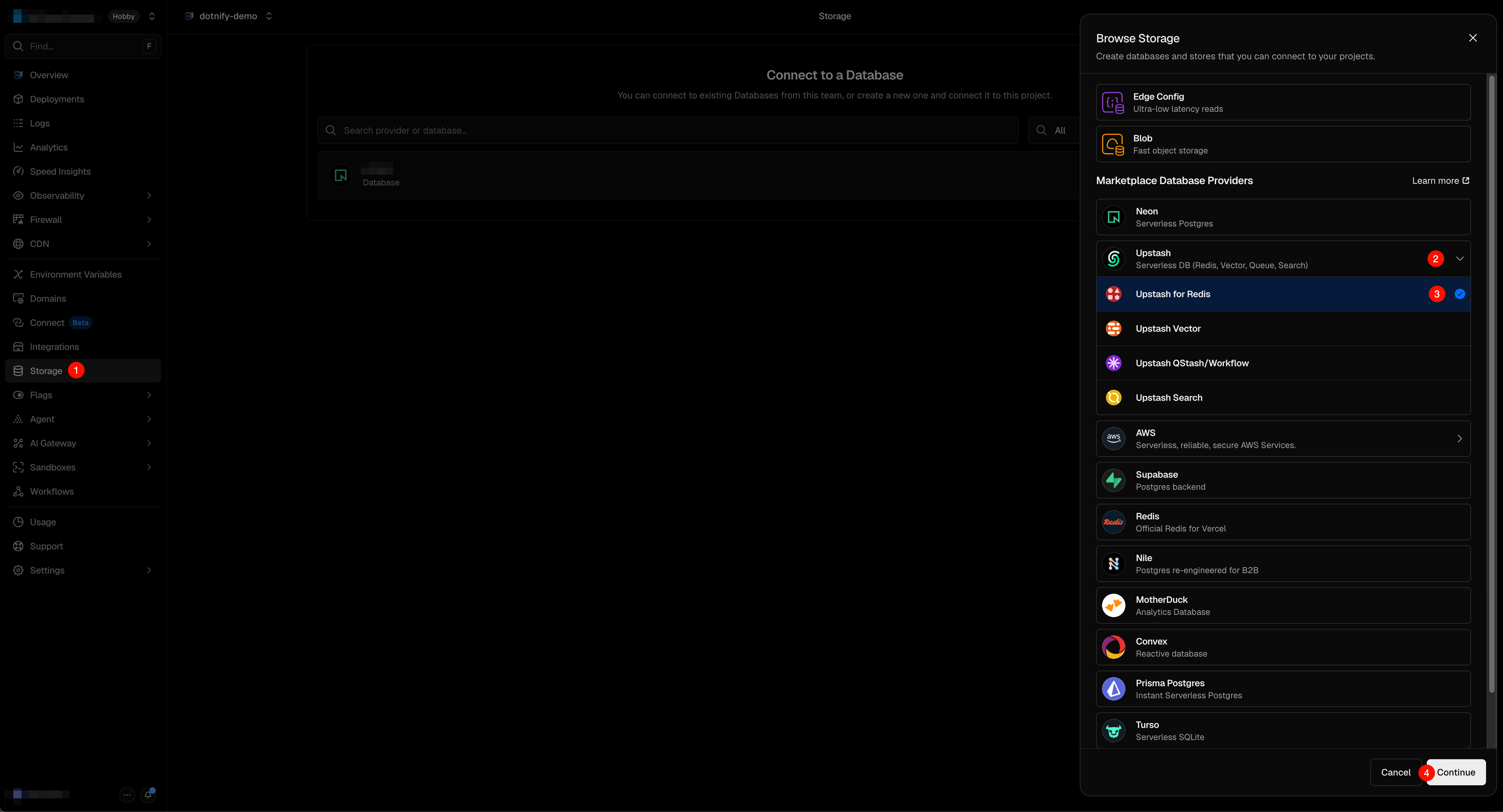
Vercel provides a built-in Upstash Redis integration that lets you create and manage a Redis database directly from your Vercel project:
Go to your Vercel project → Storage tab
Click Create Database → select Upstash Redis
Choose a region and click Create
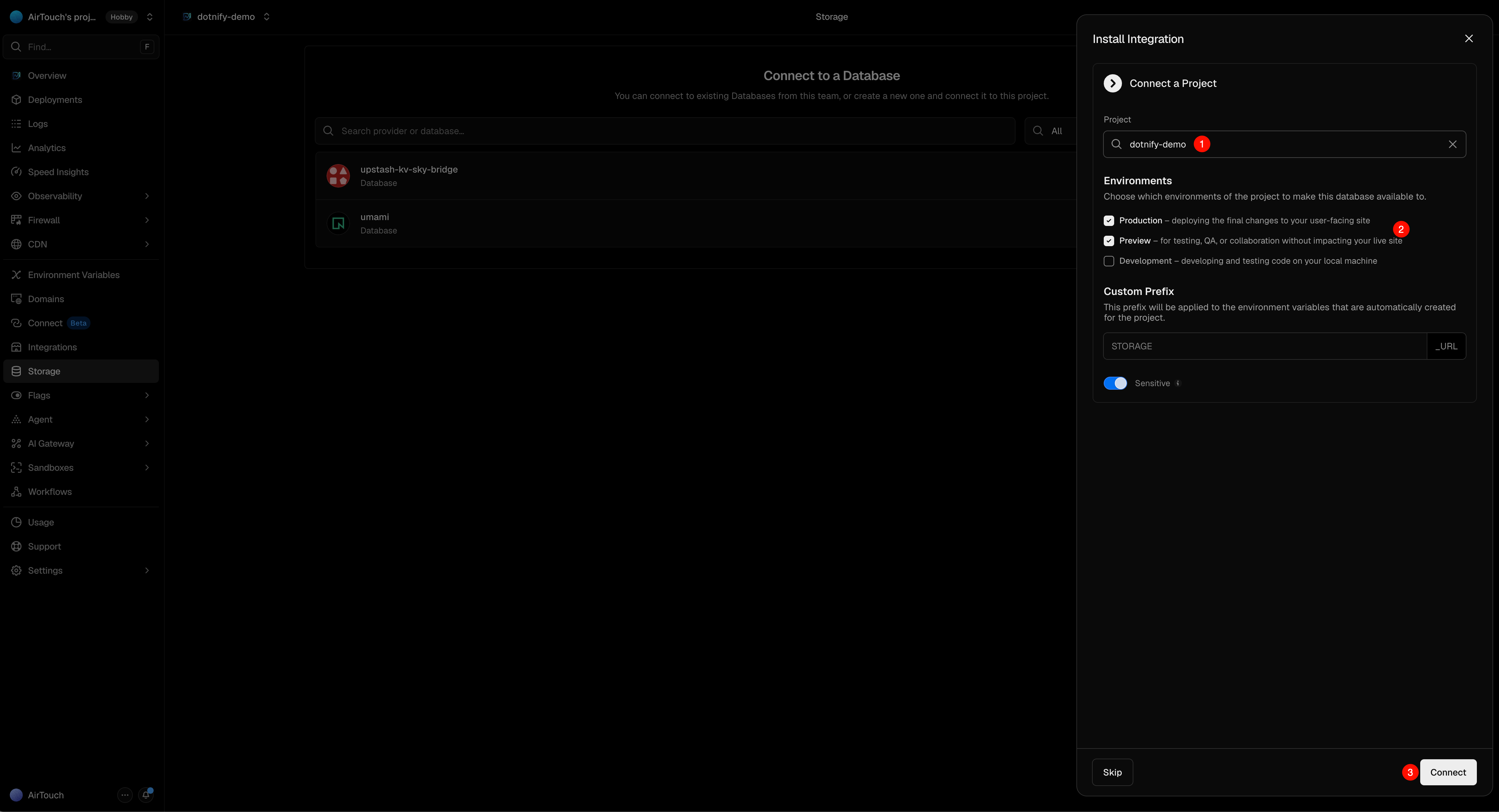
In Connect a Project, select your project and click Connect. Vercel will automatically inject
KV_REST_API_URLandKV_REST_API_TOKENinto your project's environment variables
Option B: Official or Other Third-Party Redis
Dotnify uses the @upstash/redis SDK, which communicates with Redis over a REST-compatible API. You can use any Redis service that provides a Upstash REST API compatible endpoint:
- Upstash — go to Upstash Console and create a new Redis instance, then copy the REST URL and REST Token
- Self-hosted Redis — if you have your own Redis server, you can use Upstash Redis compatible server or proxy the Redis TCP protocol to a REST API
- Other Redis providers — any provider that offers a Upstash REST API compatible interface (same URL and token format) can be used directly
Regardless of the provider, you'll need to set the REST URL and REST Token as environment variables.
3. Configure Environment Variables
If you used the Vercel Upstash integration, the environment variables are already set. Otherwise, add them manually in the Vercel project settings:
| Variable | Description | Required |
|---|---|---|
UPSTASH_REDIS_REST_URL | Upstash Redis REST URL | Yes |
UPSTASH_REDIS_REST_TOKEN | Upstash Redis REST token | Yes |
4. Deploy
In Deployments, click the latest deployment and select Redeploy to redeploy 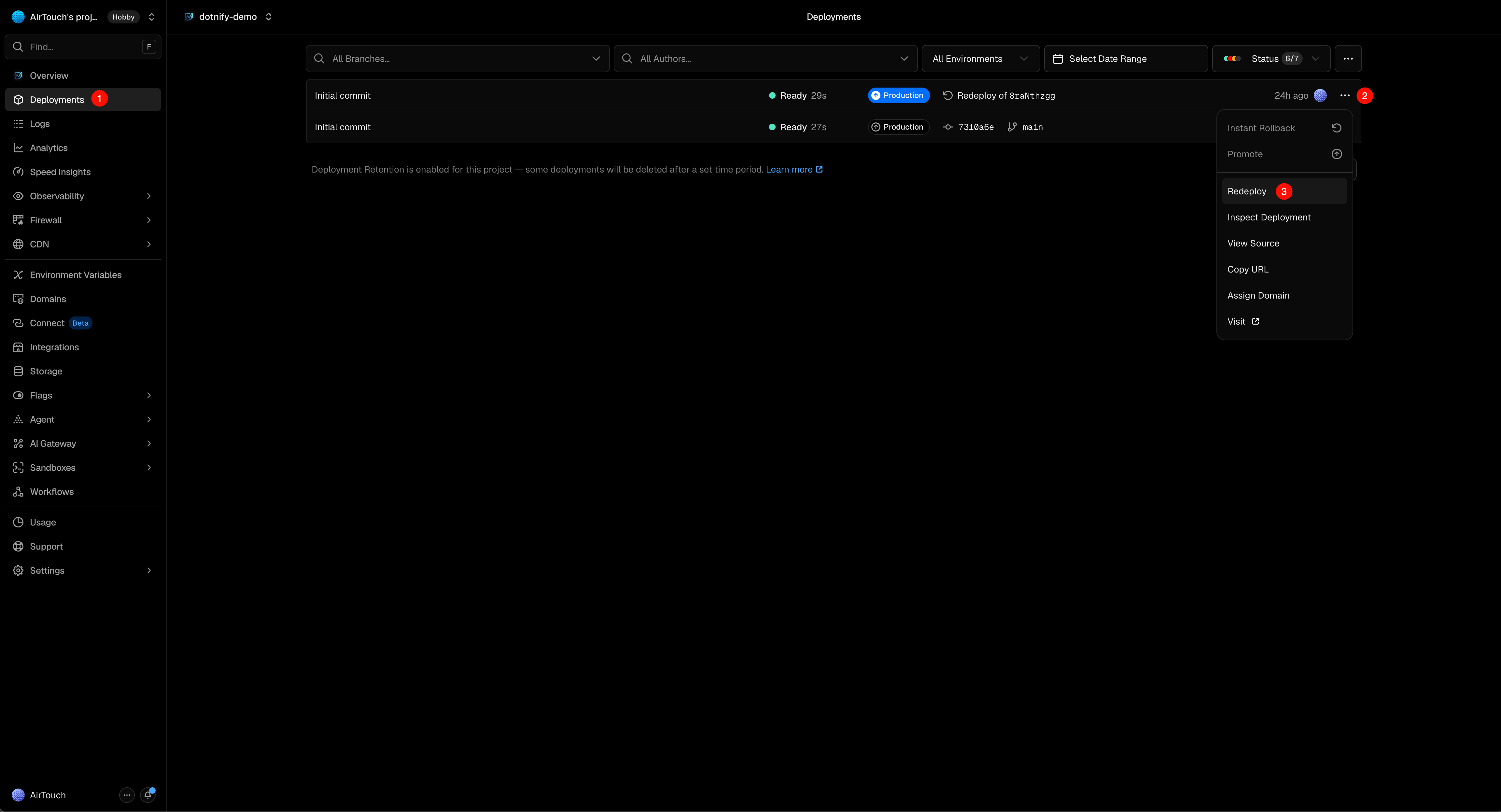
Railway
Railway is a deployment platform that supports deploying from a GitHub repository with automatic builds.
One-Click Deploy

After clicking the button, Railway will clone the repository and start the build. You still need to configure the environment variables and start command (see below).
Manual Deploy
1. Create an Upstash Redis Database
- Go to the Upstash Console and create a new Redis instance
- Copy the REST URL and REST Token — you'll need them in the next step
If you already have an Upstash Redis instance from another deployment, you can reuse it.
2. Deploy to Railway
- Go to Railway and sign in with GitHub
- Click New Project → Deploy from GitHub repo
- Select the Dotnify repository (fork the
mainbranch first if you don't own it) and choose themainbranch - Railway will auto-detect the Node.js environment
3. Configure Environment Variables
In the Railway project dashboard, go to Variables and add:
| Variable | Description | Required |
|---|---|---|
UPSTASH_REDIS_REST_URL | Upstash Redis REST URL | Yes |
UPSTASH_REDIS_REST_TOKEN | Upstash Redis REST token | Yes |
PORT | Server port (Railway auto-injects PORT, no need to set manually) | No |
4. Configure Start Command
Railway may not auto-detect the correct start command. In the project Settings, set the start command to:
npm run startRailway will build and deploy the project. Once deployed, you can generate a public domain in Settings → Networking.
Zeabur
Zeabur is a deployment platform that supports deploying from a GitHub repository with zero configuration.
One-Click Deploy

After clicking the button, Zeabur will clone the repository and start the build. You still need to configure the environment variables (see below).
Manual Deploy
1. Deploy to Zeabur
- Go to Zeabur and sign in with GitHub
- Click New Project and select a region
- Click Add Service → Git → select the Dotnify repository (fork the
mainbranch first if you don't own it) and choose themainbranch - Zeabur will auto-detect the Node.js environment and build the project
2. Add Redis Service
- In the same project, click Add Service → Marketplace → select Redis
- Zeabur will automatically provision a Redis instance
Zeabur's built-in Redis does not provide a Upstash REST API compatible endpoint by default. You have two options:
Option A: Use Upstash Redis (Recommended)
- Go to the Upstash Console and create a new Redis instance
- Copy the REST URL and REST Token
Option B: Use Zeabur Redis with a REST Proxy
If you want to use Zeabur's built-in Redis, you'll need a REST API proxy (e.g. upstash-redis-compatible-server). This requires additional configuration.
3. Configure Environment Variables
In the Dotnify service → Variables, add:
| Variable | Description | Required |
|---|---|---|
UPSTASH_REDIS_REST_URL | Upstash Redis REST URL | Yes |
UPSTASH_REDIS_REST_TOKEN | Upstash Redis REST token | Yes |
4. Generate Domain
In the Dotnify service → Networking, click Generate Domain to get a public URL.
Docker
Dotnify provides pre-built Docker images for both linux/amd64 and linux/arm64, published to Docker Hub and GitHub Container Registry.
Quick Start
Docker Hub:
docker run -d --name dotnify \
  -p 3000:3000 \
  -e UPSTASH_REDIS_REST_URL="https://your-redis.upstash.io" \
  -e UPSTASH_REDIS_REST_TOKEN="your-redis-token" \
  airtouch97/dotnify:latest
GHCR:
docker run -d --name dotnify \
  -p 3000:3000 \
  -e UPSTASH_REDIS_REST_URL="https://your-redis.upstash.io" \
  -e UPSTASH_REDIS_REST_TOKEN="your-redis-token" \
  ghcr.io/airtouch97/dotnify:latest
Tip: If you have trouble pulling images, consider using a mirror registry. For example, replace
docker.iowith a mirror address, or replaceghcr.iowith a corresponding GHCR mirror.
docker-compose
Create a docker-compose.yml:
services:
  dotnify:
    image: airtouch97/dotnify:latest  # or ghcr.io/airtouch97/dotnify:latest
    ports:
      - "3000:3000"
    environment:
      - UPSTASH_REDIS_REST_URL=https://your-redis.upstash.io
      - UPSTASH_REDIS_REST_TOKEN=your-redis-token
    restart: unless-stopped
Then start the service:
docker compose up -dProduction Deployment
- Build the project:
npm run buildSet the required environment variables (see below).
Start the server:
npm run startThe server listens on http://localhost:3000 by default (configurable via the PORT environment variable), serving both the compiled frontend from dist/ and the API routes.
Environment Variables
| Variable | Description | Required |
|---|---|---|
UPSTASH_REDIS_REST_URL | Upstash Redis REST URL | Yes |
UPSTASH_REDIS_REST_TOKEN | Upstash Redis REST token | Yes |
PORT | Server port (default: 3000) | No |
When using the Vercel Upstash integration, KV_REST_API_URL and KV_REST_API_TOKEN are automatically injected and take priority over the UPSTASH_REDIS_REST_* variables.
Local Development
To run the full API locally:
Using Vite Dev Server (Recommended)
The project includes a custom Vite plugin (scripts/vite-plugin-dev-api.ts) that mounts the Hono API app on the Vite dev server, so both frontend and API are served from a single port during development.
- Create a
.env.localfile in the project root:
UPSTASH_REDIS_REST_URL="https://your-redis.upstash.io"
UPSTASH_REDIS_REST_TOKEN="your-redis-token"- Start the dev server:
npm run devThe app will be available at http://localhost:3000. API edits are picked up on the next request (no manual restart needed).
Using Production Server
npm run build && npm run startThis starts the Hono Node.js server with the compiled frontend, matching the production environment.
Data Storage
Dotnify uses three Redis keys to store all application state:
| Key | Description |
|---|---|
dotnify:admin | Admin credentials (username + scrypt password hash) |
dotnify:session:<token> | Active session (7-day TTL, auto-expires) |
dotnify:providers | JSON array of configured DNS providers |
No database schema or migrations are needed. Upstash Redis is billed per request, making it a good fit for low-traffic management tools.
Security Considerations
- Password hashing: Admin passwords are hashed with scrypt (64-byte key length) before storage
- Session tokens: 32-byte random tokens with 7-day TTL in Redis
- Timing-safe comparison: Password verification uses
crypto.timingSafeEqualto prevent timing attacks - API key masking: Provider API keys are masked in API responses (only last 4 characters visible)
- Bearer token auth: All API endpoints (except
/api/auth/meand/api/auth/setup) require a valid Bearer token - No CORS configuration: The API is same-origin only — the SPA and API are served from the same deployment